
Choosing a Hotel PMS in 2026: Why We Run Republika on HospiCore
Every hotel runs on a system — whether that’s a paper register, a spreadsheet, or a full property management system (PMS). After more than 25 years of welcoming guests at Republika, we know how much the right one matters. This guide walks through the options hotel owners in Pakistan have today, what to look for, and why both Republika Central and Republika Urban now run on HospiCore PMS.
What does a PMS actually do?
A property management system is the operating system of a hotel. At minimum it handles reservations, check-in and check-out and the guest bill (the folio). A good one goes much further: it keeps your online channels in sync, tells housekeeping which rooms to turn, closes the day with a night audit, tracks income and expenses, and gives the owner a clear picture of occupancy and revenue — ideally from a phone, wherever they are.
Your PMS options in 2026
1. Paper registers and spreadsheets
Free and familiar, but fragile. Double bookings creep in the moment you list on Booking.com or Airbnb, room-service chits go missing before they reach the bill, and the owner only sees the numbers when someone remembers to update the sheet.
2. Traditional desktop PMS
Many older systems were designed to be installed on a single front-desk computer. They can be solid for basic reservations, but remote access, mobile apps, online-channel sync and upgrades are often extras — and if that one PC fails, so does your front desk.
3. Large international cloud suites
Powerful platforms built for hotel chains. They’re typically priced and packaged for large properties, with key features split into paid modules or third-party add-ons, and they aren’t always a natural fit for a 10–50 room hotel in Abbottabad, Murree or Hunza.
4. Modern, all-in-one cloud apps — like HospiCore
A new generation of PMS that runs in the cloud, works on every device, and bundles the whole operation — front desk, kitchen, housekeeping, store and finance — into one subscription priced for independent hotels.
How the options compare
| Capability | Registers / Excel | Traditional desktop PMS | Large cloud suites | HospiCore PMS |
|---|---|---|---|---|
| Web + Windows + Android on one synced account | — | Rarely | Web, some apps | ✓ |
| Guest QR ordering from the room | — | — | Usually an add-on | ✓ Built in |
| Kitchen order board with recipes & stock | — | Separate POS | Separate POS | ✓ |
| Airbnb & Booking.com availability sync | — | Paid extra | Channel manager fee | ✓ Free |
| Drag-to-book occupancy timeline | — | Varies | ✓ | ✓ |
| Housekeeping checklists with SOP alerts | — | Varies | Varies | ✓ |
| Night audit, ADR / RevPAR, PDF & Excel reports | — | ✓ | ✓ | ✓ |
| Finance suite: income, expenses, charts | Manual | Varies | Often an add-on | ✓ |
| Guest ID images auto-deleted after checkout | — | — | Varies | ✓ 7 days |
| Every feature included in every plan | — | Modules | Tiers & modules | ✓ From $15/mo |
Comparison reflects typical products in each category; individual systems vary.
The feature guests notice: QR ordering from the room
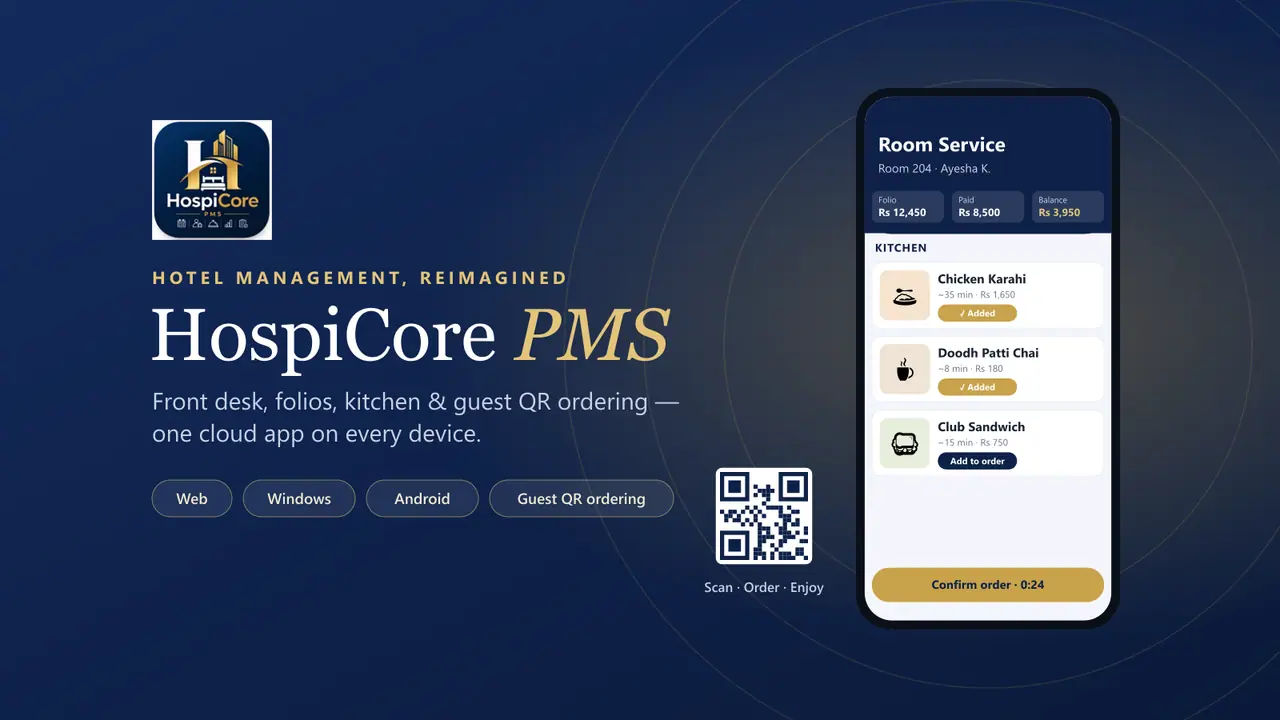
This is where HospiCore feels genuinely different. Instead of a guest ringing reception, reception phoning the kitchen and someone scribbling a chit that may or may not reach the bill, the whole journey is digital:
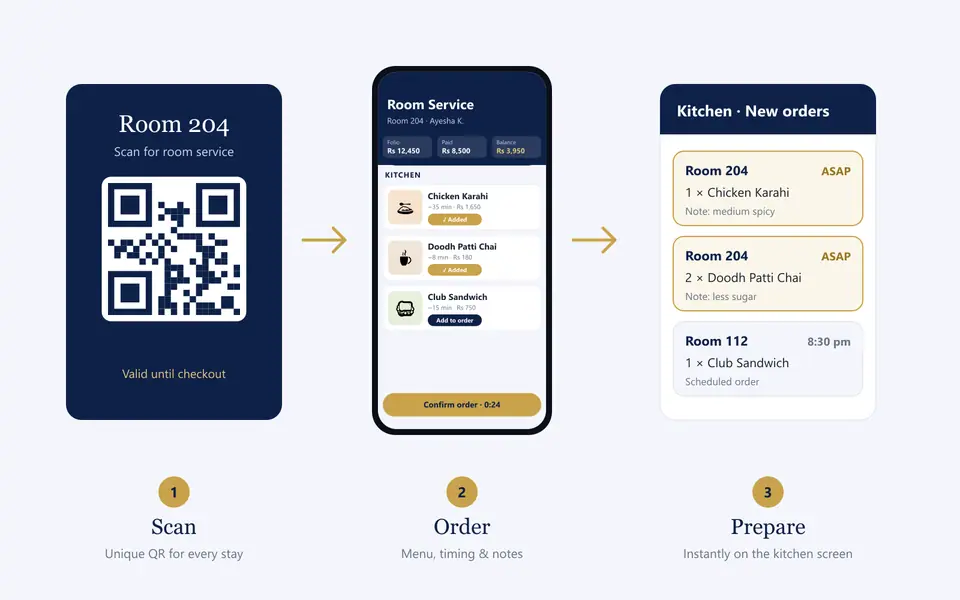
- Scan. Every stay gets its own unique QR code, generated at check-in. The guest scans it with their phone camera and a room-service page opens instantly — no app, no login, already showing their name and room number. When the guest checks out, that code stops working, so an old QR can never be used to place orders on someone else’s bill.
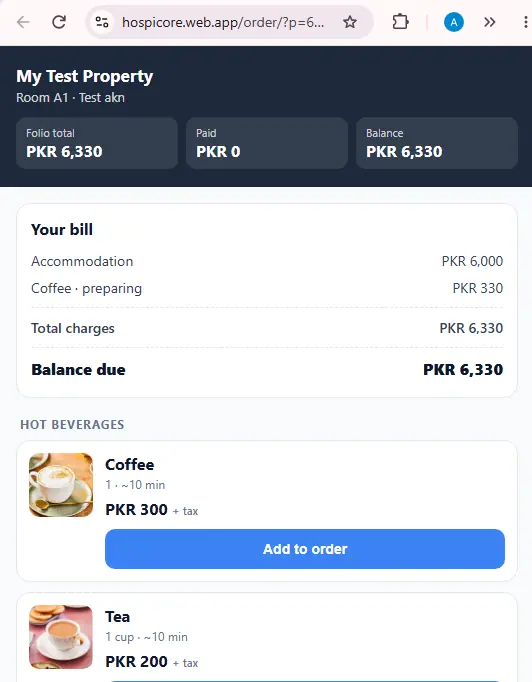
- Browse & customise. Dishes appear by category with photos, prices (plus tax) and the kitchen’s estimated preparation time. Guests choose servings, ask for it as soon as possible or at a time they pick, and add special requests like “no sugar” or “extra spicy”.
- Review, then confirm. A short review window lets the guest change their mind before anything is sent — nothing reaches the kitchen until they confirm.
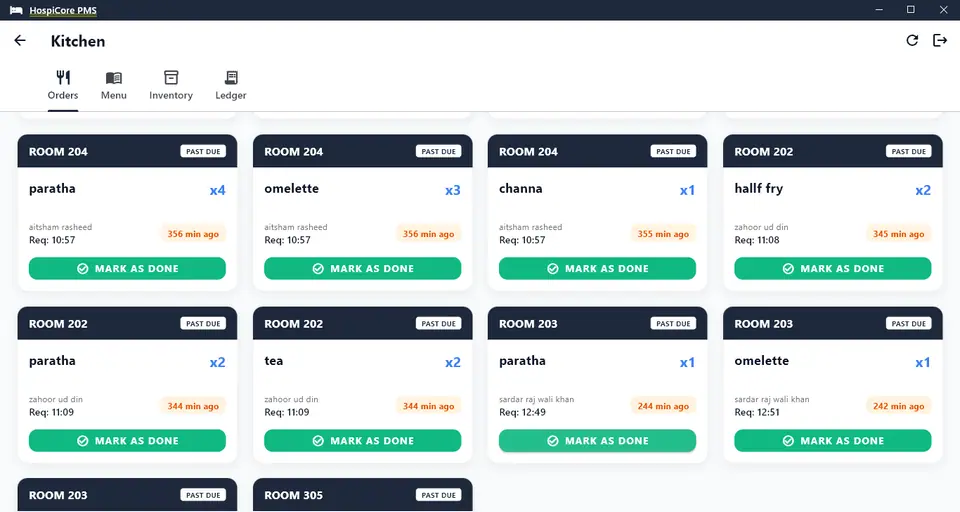
- Straight to the kitchen board. The order lands on the kitchen screen with the room, guest name, requested time and a live timer, flagged past due if it runs late. One tap marks it done.
- Automatically on the bill. The charge posts to the guest folio with tax, and the guest can see their live bill — folio total, paid and balance — right on the same page. No missed charges, no surprises at checkout.
A kitchen that manages its own stock
Behind the scenes, HospiCore’s kitchen module holds your menu, recipes and ingredients. Each dish is linked to its ingredients, so when a guest orders a coffee the milk is deducted from stock automatically — and it shows up in the kitchen ledger with the folio number it belongs to. Dishes can be switched on or off in one tap when something runs out.
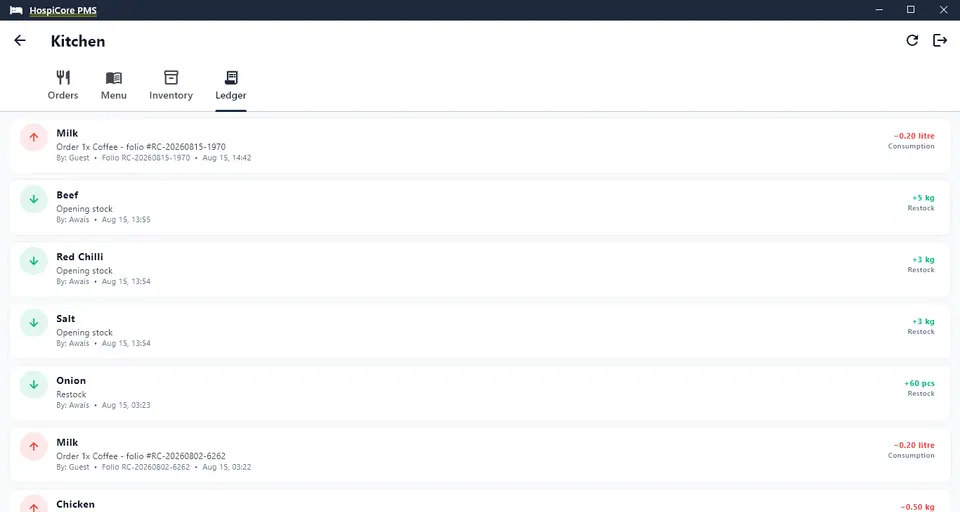
For hotel owners the result is simple: more room-service revenue, fewer mistakes, and a clear audit trail from the guest’s tap to the stock room.
One account, every device
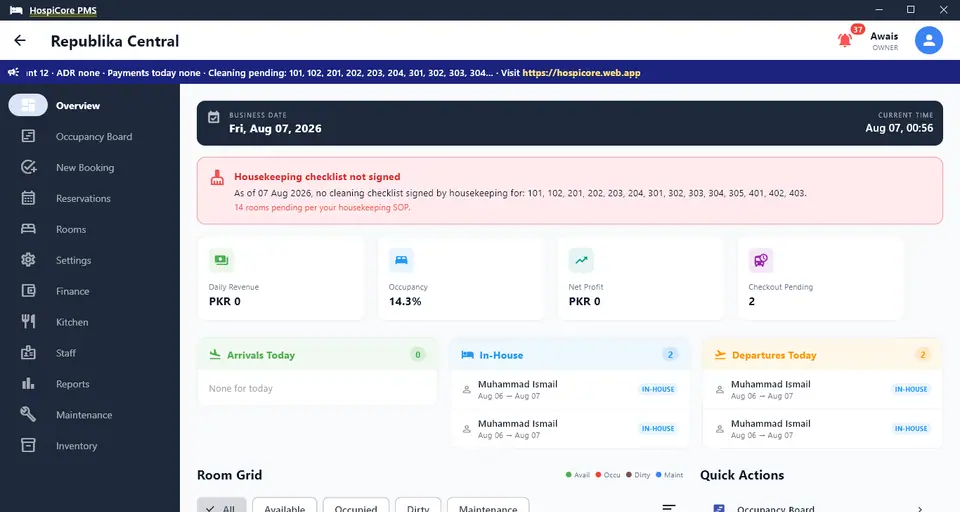
HospiCore runs on Windows, Android and the web — all on one synced account backed by Google Cloud. Reception can work on the front-desk PC, housekeeping and the kitchen on Android phones or tablets, and the owner can check occupancy and cash from a laptop in Islamabad or a phone on holiday. It’s built to keep working through brief internet outages, which matters in the hills.
Everything else you get in the box
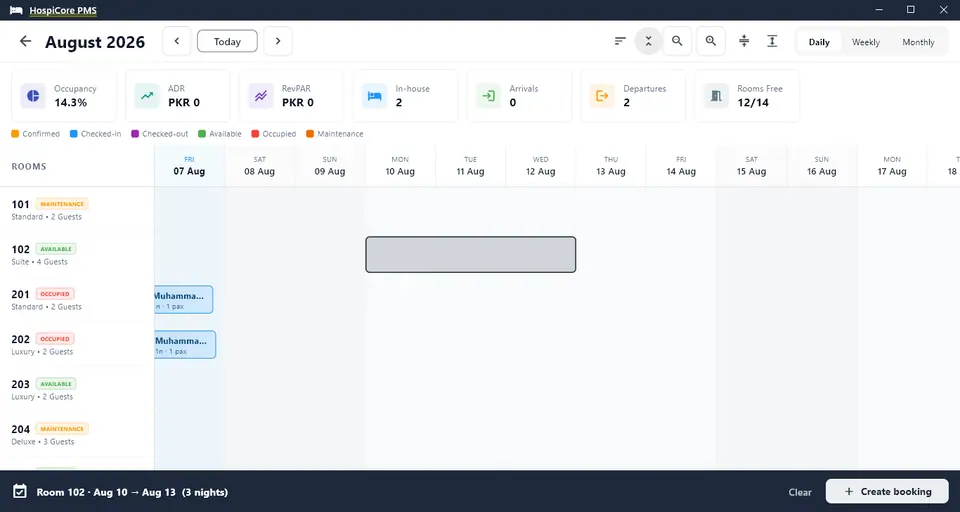
- Visual drag-to-book. Drag across dates on the colour-coded occupancy timeline and a booking opens with the room and dates pre-filled. Zoom, sort, and see the month at a glance.
- Reservations & front desk. Individual and group (multi-room) bookings, check-in/out, CNIC/passport capture and an interactive room grid.
- Free channel sync. Connect Airbnb and Booking.com once via calendar links; a booking on any channel blocks the room everywhere. (Availability syncs every few hours — prices are managed on each channel.)
- Your own direct-booking page. The Book now buttons on this very website open Republika’s HospiCore booking engine, so direct guests book commission-free.
- Guest folios & billing. Lodging and service charges, payments, refunds, overstays and professional invoices.
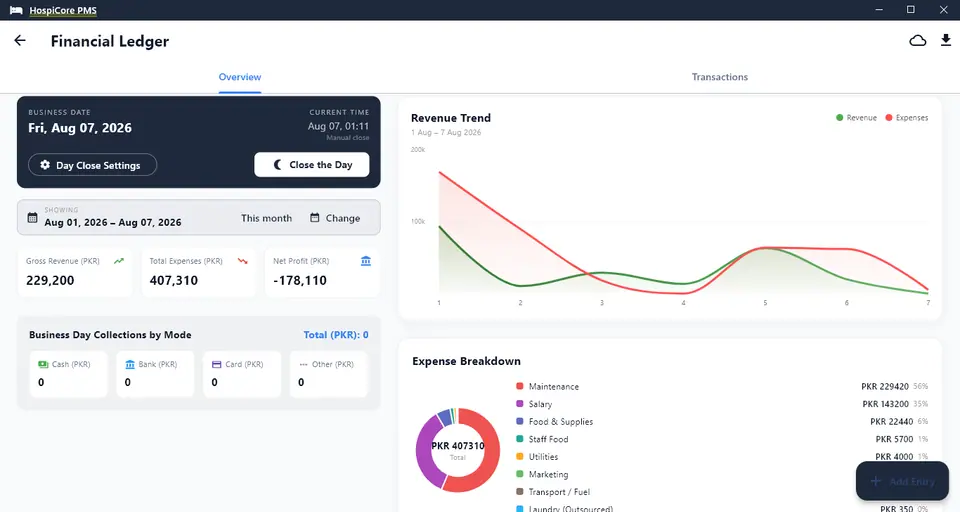
- Night audit & reports. Daily business-date close, occupancy, ADR and RevPAR, with PDF and Excel exports.
- Finance suite. Income and expenses by category and payment mode, revenue trends and expense breakdowns.
- Housekeeping & compliance. Standard cleaning checklists signed by staff, with owner and manager alerts when rooms aren’t signed off per your SOP.
- Staff roles. Owner, manager, receptionist, housekeeping, kitchen and store roles, each with fine-grained permissions.
- Store inventory. Catalogue, maintenance tracking, issue reporting and accountable sign-off.
- Guest ID privacy. ID images are automatically deleted from the servers seven days after checkout.
Simple, honest pricing
HospiCore is priced by the number of rooms, and every plan includes every feature — QR ordering, kitchen, channel sync and all. Plans start at US$15/month for up to 5 rooms, $25 for up to 10, $45 for up to 20, $65 for up to 30 and $100 for up to 50 rooms, with larger plans up to 150 rooms. Paying yearly gives you two months free.
At the time of writing, HospiCore is running a launch offer: the first month is free, including setup and onboarding, with six months free for a limited number of early properties. Check the pricing page for current details.
A quick checklist for choosing a PMS
- Can my staff use it on the devices they already have — PC, Android, browser?
- Does it stop double bookings with Booking.com and Airbnb without an extra monthly fee?
- Do room-service and restaurant charges reach the guest’s bill automatically?
- Can I see occupancy, revenue and expenses from my phone?
- Are features like kitchen, housekeeping and finance included — or sold as modules?
- How does it handle guests’ ID documents and privacy?
- Is there local support that understands hotels in Pakistan?
Our verdict
With both of our hotels on HospiCore, our online channels stay in sync, room-service orders travel straight from the guest’s phone to the kitchen and onto the bill, and we can see how both properties are doing from anywhere. If you run a guest house, boutique hotel or resort, it’s well worth a look.
Try HospiCore PMS free for a month
Web, Windows & Android · Guest QR ordering · Free channel sync
Questions? Email pms@sinewaveint.com · Reviews on Capterra